
 Login
Login
Mail Round-trip scenarios
Scenario 1. Default configuration
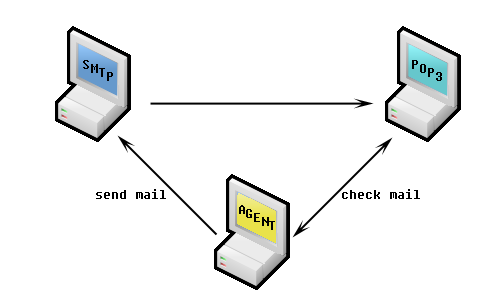
Goal: Monitor usual mail receiving procedure.
The SMTP server is responsible for the domain of the POP3/IMAP server.
When a message is send to the SMTP server it is dispatched to the POP3 or IMAP mailbox, where it is checked by the monitoring agent.
The monitoring agent communicates with the clients SMTP and POP3/IMAP.
Scenario 2. No POP3/IMAP access from outside - use WebSitePulse mailbox
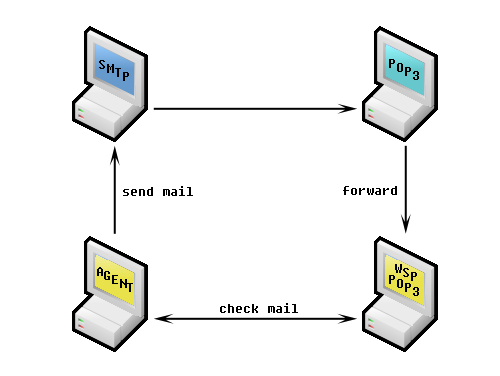
Goal: Monitor mail-roundtrip procedure without worldwide open POP3/IMAP server.
The SMTP server is responsible for the domain of the POP3/IMAP server.
When a message is send to the SMTP server it is dispatched to the POP3/IMAP mailbox. From the clients POP3/IMAP server the message is forwarded to a WebSitePulse mailbox (for example mailtest1.websitepulse.net) where it is checked by the monitoring agent.
The monitoring agent communicates with the clients SMTP and WebSitePulse POP3/IMAP. This scenario is usually used to monitor Microsoft Exchange Servers.
Scenario 3. Send via authenticated SMTPs (not implemented yet)
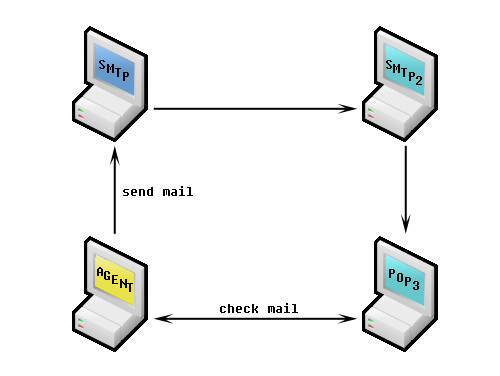
Goal: Monitors SMTP servers with authentication and forwarders (relays).
The SMTP server is NOT responsible for the domain of the POP3/IMAP server.
When a message is send to the SMTP server it is then forwarded to the SMTP server (SMTP 2) responsible for the domain where it is dispatched to the POP3/IMAP mailbox. Afterwards it is checked by the monitoring agent at the POP3/IMAP mailbox.
The monitoring agent communicates with the clients SMTP and POP3/IMAP.
Scenario 4. No SMTP monitoring
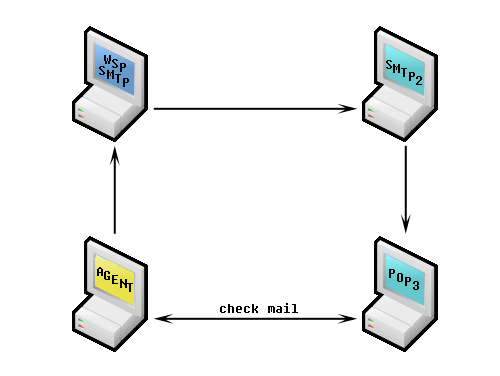
Goal: Don't want to monitor directly SMTP server.
The message is sent via the local mail sending program. It reaches the WebSitePulse.com mail server (WSP SMTP) from where it is sent to the SMTP server responsible for the clients domain (SMTP2). After the message is delivered to the SMTP server it is dispatched to the POP3/IMAP mailbox, where it is checked by the monitoring agent. The monitoring agent communicates with the clients POP3/IMAP only. The Message sending procedure will not be monitored.
Scenario 5. No clients SMTP/POP3/IMAP servers are directly monitored
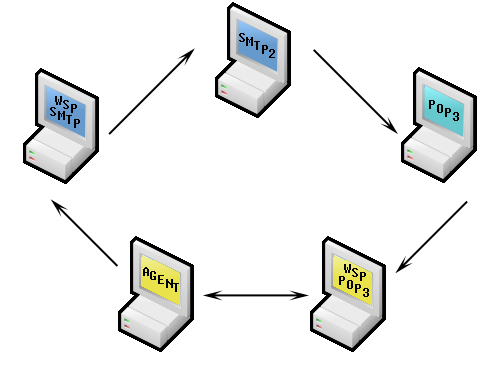
Goal: Don't want to monitor directly SMTP or POP3/IMAP servers.
The monitoring agent communicates with the WebSitePulse POP3/IMAP only. The Message sending procedure will not be monitored. The response times of the clients mail servers will not be monitored.
Similar topics
Knowledge base
- Secondary Mail Server
- Custom Mail Headers
- Delay before receiving mail
- Use test emails with attachment
- Target Label
Howtos
Glossary
- SMTP / Simple Mail Transfer Protocol
- MX record / Mail exchanger record
- IMAP / Internet Message Access Protocol
- POP3 / Post Office Protocol 3
- Voice call contact
Frequently asked questions
- How do I use the e-mail gateway on my cell phone to receive notifications?
- Can I pay for the Service by check?
- Do you provide technical support?
- I can monitor my own servers locally. Why do I need WebSitePulse.com?
